Start with what you have.
Describe the job, upload a photo or sketch, or use a marked survey. AI helps organize the proposed fence runs, gates, and scope questions.
The complete fence contractor workspace
Measure the runs. Use your reviewed supplier prices. Catch missing details before the proposal goes out—then keep the customer, crew, and final costs connected to the job.
14 days free · No credit card required
See the actual product Real screens. Sample company.
Homeowner pricing a fence? Try the free fence cost calculator
From your first quote
to your final invoice.

See the work behind the number
Walk through a wood privacy fence example calculated by our estimating engine. Inspect the scope, material quantities, and costs before you create an account.
Want to see the workspace? Take the screenshot tour ↗
Two fence runs and a walk gate. Each connection has a job to do.
22 posts and 26 bags of concrete, derived from the sample's layout and assumptions.
| Material | Quantity |
|---|---|
| Wood Post 4x4 10ft | 22 ea |
| Wood Post Cap | 22 ea |
| Wood Privacy Panel 6ft × 8ft | 20 ea |
| Concrete Bag 80lb | 26 bag |
| Gravel Drainage 40lb | 6 bag |
| Screws (1lb box) | 3 ea |
Selected lines only. The full sample includes gate hardware and the calculation audit.
Fixed demo prices and labor assumptions. These are estimated costs, before your selling price and margin.
This sample still needs current company prices, corner angles, and site conditions reviewed before it can become a customer quote.
Fixed demo inputs and starter prices. Not a real customer quote or a price for your next job.
Actual product · sample company
Measured scope on one side; price, estimated profit, and a quote-blocking reminder on the other. The screenshot shows a draft that still needs customer information—not a finished sale.
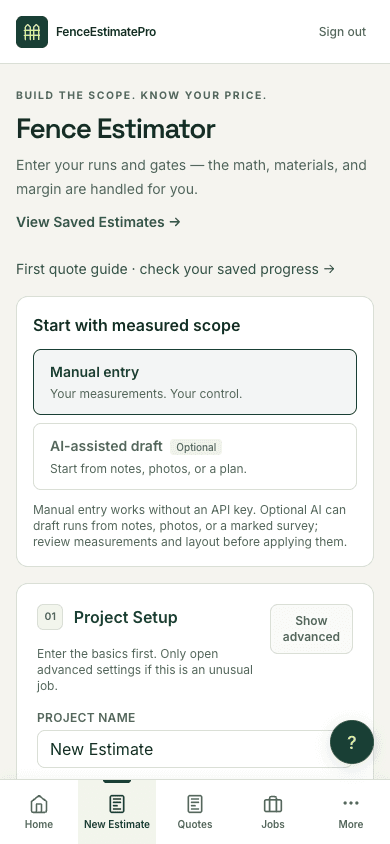
On mobile, start a draft with measured scope and project setup. Review the calculated costs and missing details before sending a quote; this capture is the start screen, not the finished estimate.
Walk through the real workspace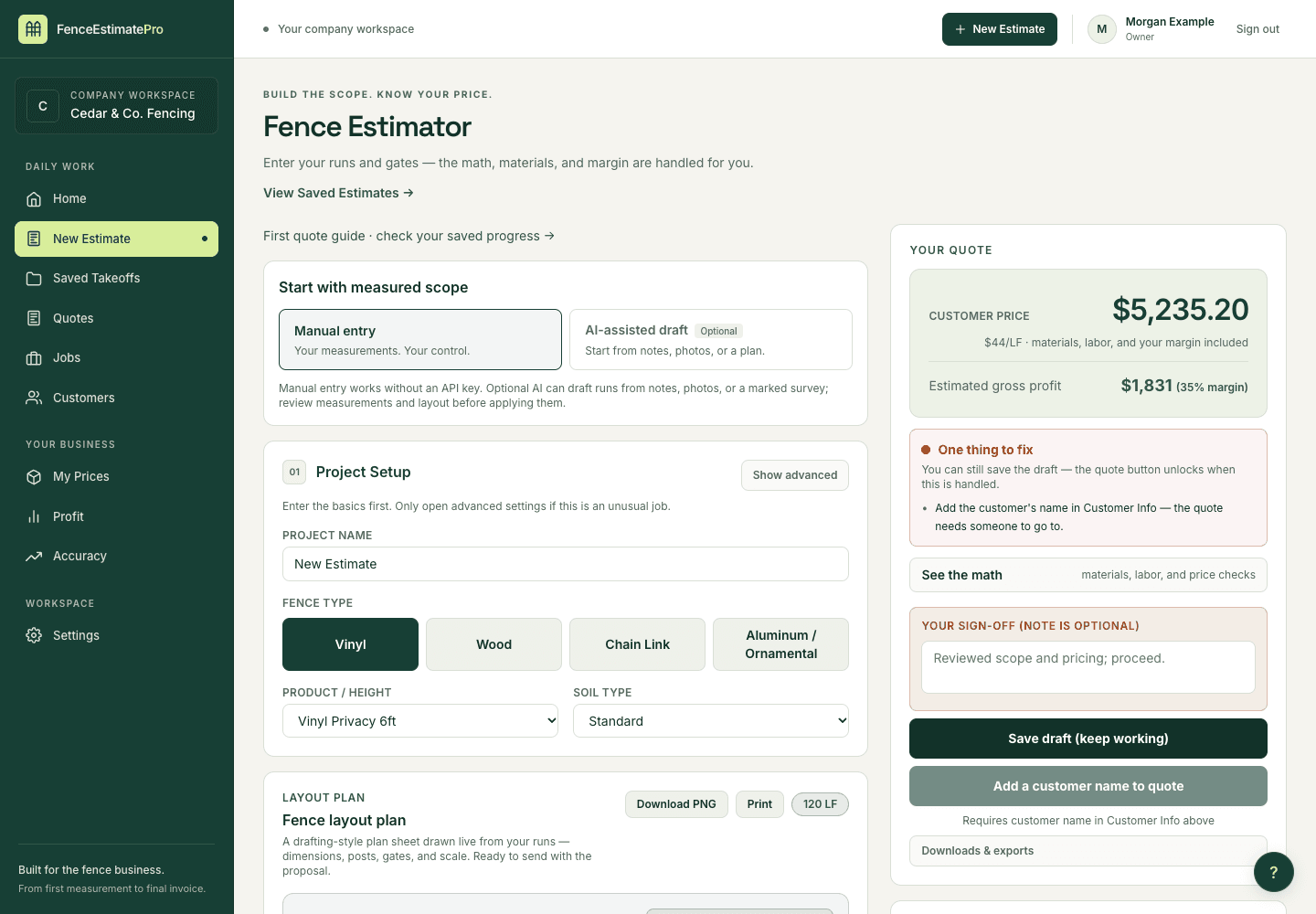
THE TOOLS BEHIND A STRONGER BUSINESS
The measuring is just the beginning. Bring the people, paperwork, and numbers behind every job into one organized workspace.
YOUR BUSINESS, CONNECTED
Scheduled2
In progress2
Complete2
Price runs, gates, materials, labor, and site conditions. See the costs and check your target margin before the quote goes out.
Estimating & takeoffsKeep contact details, property information, notes, and estimate history together. Import the customers you already have.
Customer managementSend professional proposals for digital signature. Set payment terms, record deposits, and prepare the final invoice.
Proposals & invoicesMove work from scheduled to complete. Assign a foreman, verify materials, follow checklists, and document signed changes.
Jobs & crew coordinationCreate contracts, scope-of-work documents, lien waivers, and warranty certificates from the job details you already entered.
Documents & HOA packetsCompare estimated and recorded actual profit, track customer receipts, and see which jobs still need costs or payment review.
Profitability & job actualsPlus company catalogs, guided setup, AI tools, integrations, and team roles. Features vary by plan.
Explore all 89 featuresYOUR SUPPLIERS. YOUR STANDARDS.
Bring supplier price lists into your company catalog. Review the matches, check pack sizes, and approve the prices you want your next estimate to use.
| Supplier product | Unit | Review |
|---|---|---|
| Cedar picket | Each | Matched |
| Concrete mix | 80 lb bag | Check unit |
| Gate hardware | Set | Matched |
You approve the prices before activation.
Company setup → Supplier prices → Review → Measured estimate
Get startedOPTIONAL AI. PRACTICAL ADVANTAGES.
Turn job notes, photos, and marked plans into a starting point you can review. Keep your experience in charge—and your company’s prices at the heart of the estimate.
180 feet of 6-foot cedar privacy fence. One 4-foot walk gate. Remove the existing fence.
Check the dimensions and site conditions before applying the draft.
AI assistant inside FenceEstimatePro
Describe the job, upload a photo or sketch, or use a marked survey. AI helps organize the proposed fence runs, gates, and scope questions.
Edit measurements, check uncertain details, and confirm site conditions. You decide what gets applied to your estimate.
The estimating engine calculates materials and costs from the reviewed layout and company settings. AI helps with the inputs; you control the price.
AI is optional. In-app AI uses a customer-funded API account; provider usage is billed separately. ChatGPT requires custom setup and a compatible account. Plan permissions apply. Everyday estimates, catalogs, quotes, and jobs work without either connection.
BUILT FOR THE OFFICE. READY FOR THE FIELD.
One job, with its scope, customer, crew handoff, and costs kept together. No more hunting through disconnected files to see what changed.
Add the customer, map the runs, review quantities, and check your margin. A change in scope starts with a change in the estimate.
Share the proposal for customer review and signature. Put the scope, terms, and payment schedule in writing.
Record the deposit, move into a job, and get the foreman ready. Keep materials, checklists, and signed changes together.
Prepare the final invoice and job documents. Record actual costs to see what the job earned and inform the next quote.

A focused tool for the people who measure, quote, build, and run the business.
Room to grow
From your first supplier-priced quote to a business with multiple crews. Explore the contractor workflow with a 14-day free trial. No credit card required.
$588/yr when billed monthly
Perfect for solo operators who need fast, accurate estimates.
$1,188/yr when billed monthly
For contractors running a crew. Everything in Starter, plus job management.
$2,388/yr when billed monthly
For growing operations running multiple crews and high job volume.
For teams needing more than 10 users, custom onboarding, security review, SSO, SLA, custom terms, or high-volume usage.
All plans include a 14-day free trial · No setup fees
Everyday work needs no AI connection. Optional AI drafting uses your company’s OpenAI or Anthropic API key, with usage billed separately by the provider. Plans and trials do not include funded AI credits.
Monthly plans cancel anytime. Annual plans are billed yearly and can cancel renewal anytime.
A few good questions
What to expect before you bring your fence business into FenceEstimatePro.
Talk to our teamYes. Estimating is the beginning. FenceEstimatePro also brings together supplier price catalogs, customer records, proposals, online signatures, payment tracking, job and crew management, change orders, documents, and job profitability. Feature access depends on your plan.
Start with a customer and a measured fence layout, review materials and pricing, and send a proposal. Your customer can review and sign online. With Pro or Business, continue into jobs, foreman assignments, signed change orders, invoices, and actual job costs so your office and field work stay connected.
No. Supplier imports, measured estimates, proposals, signatures, jobs, invoices, and financial records work without AI. Optional AI drafting inside the app uses a company-owned OpenAI or Anthropic API key, with usage billed by that provider. FenceEstimatePro subscriptions and trials do not include funded AI credits.
Yes. FenceEstimatePro works in your browser on phones, tablets, and desktops. Create and review estimates on site, and give foremen mobile access with Pro or Business. Use an internet connection to save records, send proposals, and keep your team’s information up to date.
Have your supplier price list and measured fence layout ready. The first-quote guide helps you confirm company defaults, import prices, review product matches and pack quantities, and save an estimate with reviewed material costs. Your progress is saved so you can pick up where you left off.
Yes. Company owners can upload a CSV, a single-sheet Excel workbook, or a supported PDF table with selectable text. Review product matches, unit conversions, and price changes before activating them. New calculations use the reviewed prices; existing saved quotes keep their totals. Unsupported products and scanned PDF files need additional preparation.
Record money you receive through your normal payment method. On Pro and Business, keep payment records with the job and issue invoices showing the contract total, amount paid, and balance due. Payment recording, invoice delivery, and installation completion are separate steps. FenceEstimatePro does not process customer card payments.
Starter includes supplier catalogs, estimating, material calculations, PDF quotes, and basic customer approval and e-signature for 1 user. Pro adds jobs, foreman access, change orders, custom PDF branding, and Owner Financials for up to 3 users. Business includes 10 users, advanced reporting, and signed document history. Enterprise is available through sales for larger teams.
You get 14 days to explore the contractor workflow with up to 3 users, with no credit card required. Everyday work needs no AI connection; optional AI provider usage is billed separately. After your trial, choose the plan that fits your operation. Monthly plans cancel anytime. Annual plans are billed yearly and can cancel renewal anytime.
Practical advice for the business side
Questions welcome
Have a question about the workflow, choosing a plan, or getting started? Tell us what you have in mind.
Already a customer? Email support@fenceestimatepro.com for account help.
Ready to explore? Start your 14-day free trial. No credit card required.
Built around the way you work
Give your estimates, customers, jobs, and crew one place to come together. Your next chapter starts with your next quote.